Sources: where job posts come from
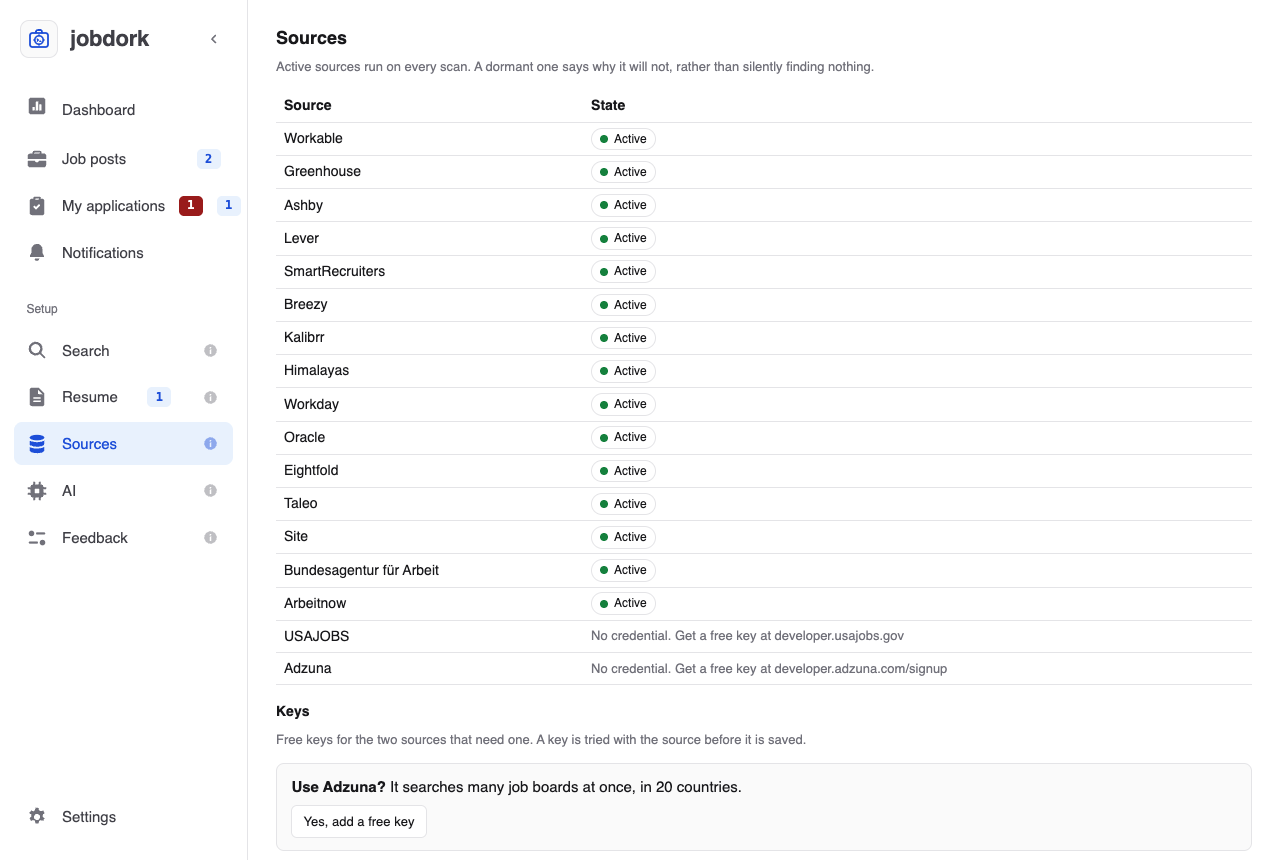
jobdork reads two kinds of places:
- Job boards searched by keyword: they take your job titles and answer for many employers at once (Workable, Himalayas for remote work, Kalibrr in the Philippines and Indonesia, Germany's employment agency, Arbeitnow, and with a free key Adzuna and USAJOBS).
- Employers' own boards: the career sites employers run on systems such as Workday, Greenhouse, Lever or Oracle. One board is one employer, and they give the whole advert, which keyword boards often cut short.
Sites like Indeed and LinkedIn are not read: they do not allow programs to read them.
The list of sources
Each source and its state. Active sources run on every scan. One that is not says why ("No credential. Get a free key at …", "skipped: only Philippine and Indonesian postings"), rather than quietly finding nothing.
Keys
Two sources need a free key: Adzuna (many job boards at once, in 20 countries) and USAJOBS (US federal government jobs). Yes, add a free key shows where to get one and where to paste it; Show shows a saved key, Replace and Remove change it. A key is tested with the source before it is saved, and never written to a file or your settings: it is held until jobdork closes, or kept in this computer's keychain if you chose that (Settings, Your keys). Beside Ready the card says which. Remove takes the key out of jobdork and the keychain both.
Add a job post
Found a post yourself, anywhere? Paste its link and Add: it is read into Job posts like any scanned post, with the whole advert. Tick I already applied and it is also marked applied on the day you give and listed on My applications, where the same form starts ticked, with the files you sent.
- A post on Greenhouse, Lever, Ashby, Breezy, SmartRecruiters, Workday, Oracle, Eightfold or Taleo Enterprise comes in whole.
- Any other page is read from what it publishes for search engines, which most careers sites do.
- When a page cannot be read (it is drawn by script, it keeps the post behind a login, or it names the job but carries no advert), jobdork says why and opens more fields, filled with whatever the link gave: paste the advert's text, check the title, employer and place, and Add again.
A Greenhouse post on the employer's own site (?gh_jid= in the link) can
also be read with its board name: open More options and type it there.
Employer boards
Employers you added. Their website, then Look to see what jobdork finds on it, or Look and add to add it. A board is read from the employer's own site, never guessed from their name: board names are rarely the company name, and a guess can find a different company. Each one shows how many jobs it has; Remove takes it off.
Built-in employer boards
Hundreds of employers' boards come with jobdork, across industries (hospitals, banks, retailers, insurers, airlines, government contractors…), each checked weekly for jobs. A scan reads the ones hiring in your countries.
- Tick industries to read only those (none ticked reads every one).
- Switch single boards off.
- More boards make scans longer.
When none is read, the section says why at the top and what to change:
for example "3 hire outside your countries (Philippines): add a country
under Search, or read every country". A scan says the same in its log, and
so does jobdork sources in the terminal.
Settings → Built-in employer boards switches them all off or on.