Resume
Your resume is what every job post is scored against (Fit), and what every cover letter and tailored resume is built from. It stays on your computer.
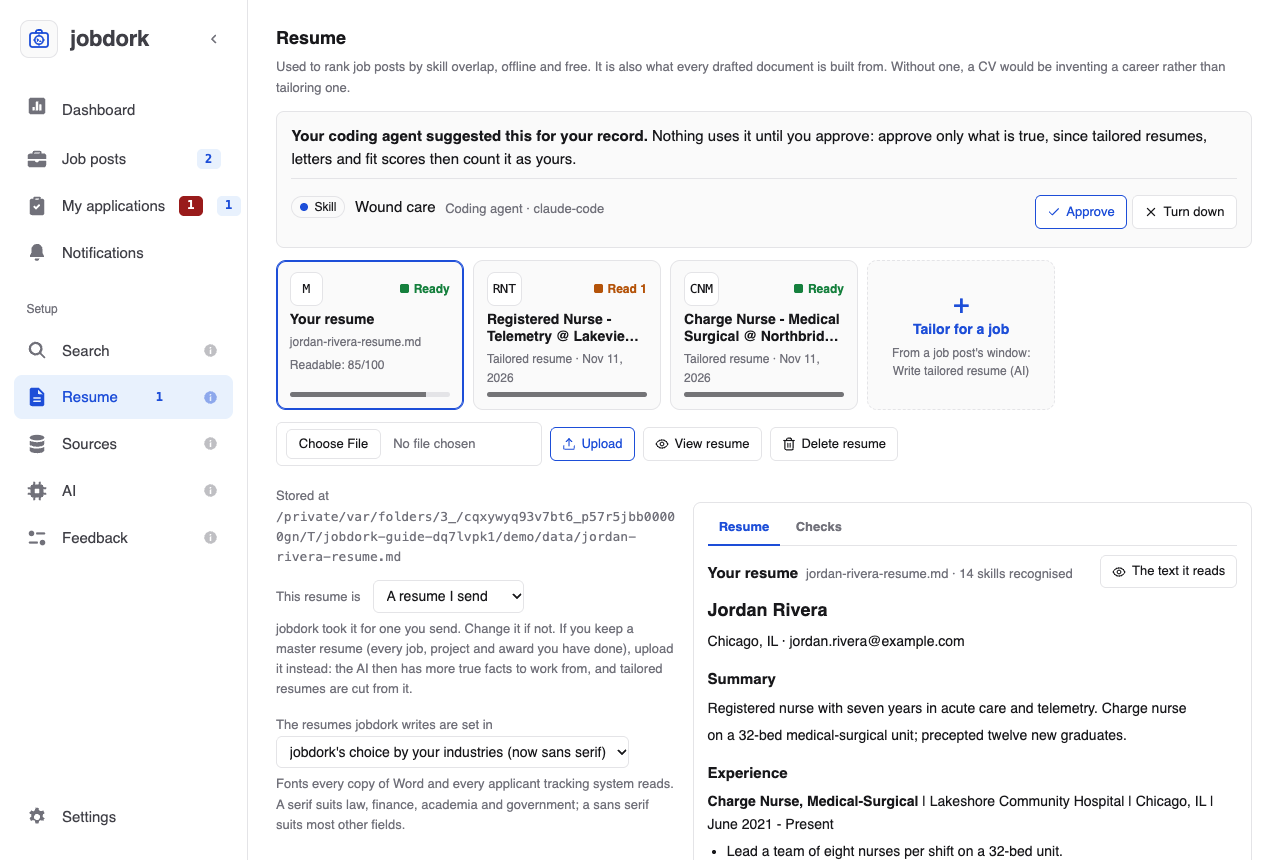
Your resumes, as cards
Across the top, a card for each resume:
- Your resume (M), or Your master resume when it is one: the file you uploaded, Ready once it is read, with its readability score as a bar (below).
- One card per tailored resume and CV, newest first: the job post's initials, its title and employer, when it was written, and Ready when every check passed or Read 1 (2, 3…) for the checks to look at before you send it. The bar is how a tracking system reads it.
- Tailor for a job opens Job posts: a tailored resume is written from a job post's window, with Write tailored resume (AI).
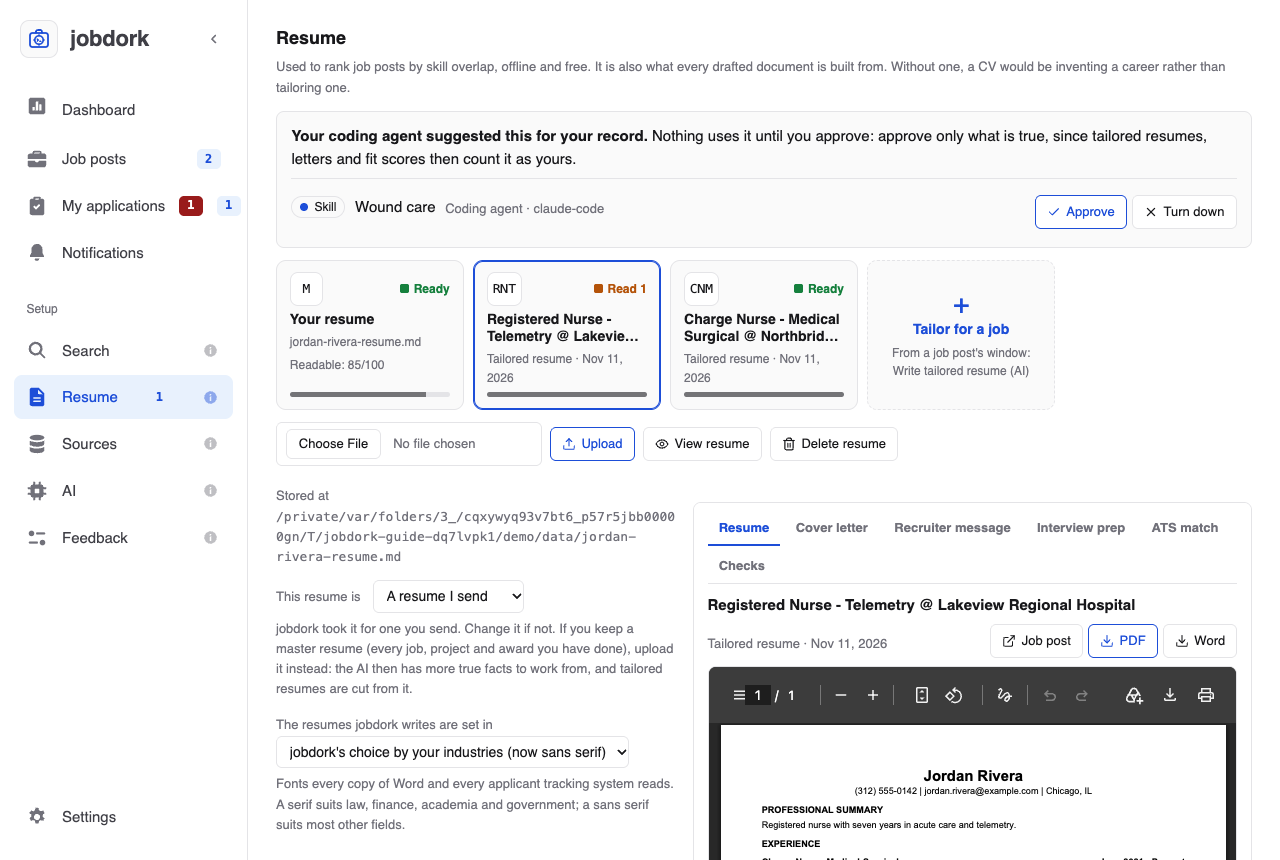
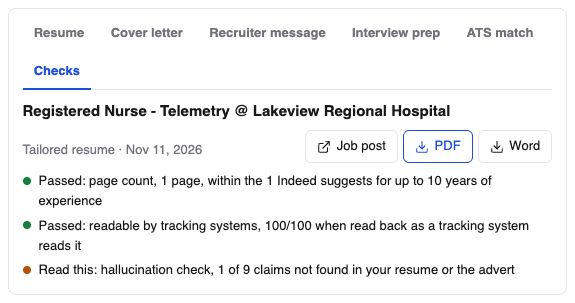
Click a card to see it on the right. Resume shows the document (a PDF as it will print), Checks shows its checks: for your own resume, how a tracking system reads it; for a tailored one, every check its tab shows. Your resume's preview has The text it reads: what the fit score and the AI were given from the file. A tailored resume's preview has Job post (its window), PDF and Word. The preview takes the right side of the page, as wide as the window allows and as tall as the window, so a page reads at full size. On a narrow window it moves above the rest.
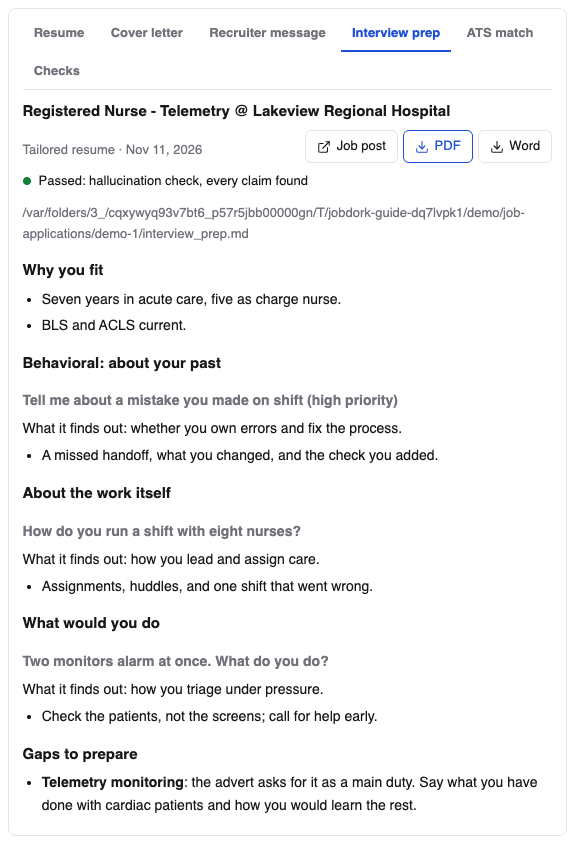
A tailored resume's preview also has a tab for each of its job post's other documents, so everything for one application is in one place: Cover letter, Recruiter message (with Copy message), Interview prep, Resume review once you have one, and the post's ATS match (the same as on its window, I have this included). One not written yet says so, with Open AI tools: the job post's window, where it is written. Choosing another tailored card keeps the tab, so you can compare, say, two cover letters.
Suggestions from your coding agent
A coding agent can suggest a project, an education entry or a skill for your record, from what you tell it. A suggestion waits here, at the top of the Resume page, with a count beside Resume in the menu, and counts for nothing until you choose:

- Approve: it joins your record, as if you had added it yourself, and your job posts are re-scored with it. Approve only what is true: tailored resumes, letters and fit scores then count it as yours, and an interviewer may ask.
- Turn down: it goes.
This is what stops an agent from adding a skill and then citing it: until you approve it, every check still treats it as not in your record. At most 25 wait at once.
Your resume
Choose File, then Upload: a PDF, Word (.docx), Markdown (.md) or
text file. A bar under the button shows the file going up, then keeps
moving while jobdork reads it; a long PDF can take a few seconds. Uploading
a new one replaces the old, and every job post is re-scored. Under the
button, Stored at gives the full path of jobdork's copy on your computer
(your own file is left where it was).
A master resume, or the one you send
If you keep a master resume, upload that. It is your private archive: every job you have had, part-time and freelance work, volunteering, projects, presentations, awards, certifications, and your skills sorted by kind. You never send it as it is; you copy, paste and trim from it to make a one- or two-page resume for each job. jobdork does that trimming for you: each tailored resume takes from the master what that job post needs. And with every true fact in front of it, the AI has more to work from, so fewer of its claims are ones it cannot back up.
No master resume? Upload the one you send. It works just as well to start, and you can upload a master later.
Under Stored at, This resume is says which jobdork took it for, and why: My master resume or A resume I send. It guesses when you upload: "master" in the file's name settles it; otherwise it takes a long text (about 1,700 words or more), with three pages or more, many dated jobs, or sections such as volunteer work and awards adding to it. A three- to five-page CV you send is not taken for a master. Change it if the guess is wrong. With a master resume:
- How a tracking system reads it does not mark it down for its length, since it is never sent.
- A tailored resume is told it is choosing from your archive, not shortening one resume line by line.
- The card says Your master resume.
The AI reads the first 20,000 characters of a resume (about eight to ten pages). A longer one gets a note: what comes after is not seen, and a claim about it is marked unsupported, so put what matters most first.
The font of the resumes jobdork writes
Under This resume is, The resumes jobdork writes are set in chooses the typeface of every tailored resume, as a PDF and as Word: a sans serif (Arial; Helvetica in the PDF) or a serif (Georgia; Times in the PDF). Both are fonts every copy of Word and every applicant tracking system reads. Left to jobdork, it is a serif when every industry you chose under Search is one where serif is the usual choice (law, finance, banking, accounting, academia, government), and a sans serif otherwise. Body text is 11 point and your name 18, the sizes most advice gives.
How a tracking system reads it
Checks, on your resume's card, looks at the file the way an applicant tracking system's text reader does, on your computer, with no AI, and gives a score out of 100. Each problem says what to do:
| Check | What trips a tracking system |
|---|---|
| Text a computer can read | A scan or a picture of a resume: nothing to read |
| Letters come out as letters | A font that does not say which letters its shapes are, or letters spaced apart ("J O H N") |
| No page is a picture | A page that is mostly an image |
| One column | Two columns, read across line by line and mixed (dates at the right margin are fine) |
| No tables, no text boxes | Word tables and text boxes, often skipped or scrambled |
| Nothing only in the page header or footer | Your contact details in a header, which many systems skip |
| Few pictures | A photo, icons or skill bars: anything they say is lost |
| Length | Over two pages |
| Email and phone near the top | Contact details missing, or only far down the page |
| Standard section headings | No Experience, Education or Skills heading, or one split by a large first letter ("E xperience") |
| Dates, in one format | No dates, or "March 2022" in one place and "03/2022" in another |
A failed check costs 30, 12 or 4 points by how much it matters, a warning half that. A Markdown or text file has no layout, so only the content is checked. Every tailored resume jobdork writes is checked the same way (the readable by tracking systems check in its tab), and is laid out to pass. The checks follow Resume Matcher's.
How its lines are written
Under it, How its lines are written reads your resume's bullets as a recruiter does, also with no AI, and scores them out of 100:
| Rule | What it means | Costs a line |
|---|---|---|
| Starts by saying you were near the work | "Responsible for", "Helped with", "Assisted", "Worked on", "Involved in": say what you did instead ("Led", "Built", "Cut") | 40 |
| Written in the first person | "I", "my", "me" | 10 |
| Over 35 words | More than two lines | 10 |
| Same first word as other bullets of this job | Three or more bullets of one job starting alike | 10 |
| No figure | No number, where a result could be counted | 5 |
Each rule is shown once, with how many lines it found and three of them. A PDF's bullet marks are usually drawn rather than written, so from a PDF the lines of your Experience section are read as its bullets. Only English is scored. A tailored resume is told the same rules, and its tab has a resume writing check that says Read this when a bullet starts by saying you were near the work; "no figure" stays a note, since a figure may only come from your resume.
- View resume shows it, and under The text the fit score and the AI read, exactly what jobdork could read from it, with the skills it found. If something is missing there, the file's layout hid it (usually a table, columns or a text box): applicant tracking systems will miss it too. Download original gives you your file back.
- Delete resume removes it from jobdork.
Projects
Work your resume does not describe well, in your own words: any kind of project, not only software. An app, articles you wrote, a campaign you ran, research, an event, volunteering, a personal project.
Add a project asks for a name, the kind, your part in it, the tools or methods, a link, and four short answers (the STAR method interviewers use):
- Situation: what was the context or the problem?
- Task: what were you responsible for?
- Action: what did you do, and how?
- Result: what changed because of it? A number makes it believable.
Every project goes into a tailored resume (the most relevant first) and counts toward Fit. Where the section goes is decided per job post: near the top for a student or a career changer, after the jobs for someone with years in the field. Save project keeps it; Edit and Delete are on each one.
Education
A degree, diploma, certificate or course your resume does not show yet: one you finished since you wrote it, or are studying for now ("Expected May 2027"). Save education keeps it. It goes under Education in a tailored resume, and job posts are re-scored when you save one.
Resume review
Review my resume has the AI read your resume and list what to fix, each point quoting the line it is about. A point that quotes something not in your resume is dropped, so it cannot invent problems. To compare your resume with one job, use Review resume for this post in that post's window.
For your search
From your resume alone, by the model on the AI page and checked as everything it writes is. Each button opens a short form; Write it starts it, and the answer appears below, with Copy for what you would paste.
| Button | What you get | What it asks |
|---|---|---|
| LinkedIn headline and About | A headline (at most 220 characters) and an About section (about 1,500) in the words recruiters search for, ten skills your resume shows (one it does not is left out and named), five phrases for your Experience entries, and a few quick wins. Text to copy: jobdork never logs into LinkedIn or posts there | The job you want; optionally your headline and About now, and the fields or employers you aim for |
| Changing field | What in your background carries over and what the new field calls it, a 30-second and a 2-minute way to explain the move, an honest list of gaps (and which ones employers screen for), a paragraph for your resume summary or LinkedIn, and answers to "why you over someone with direct experience?" | The field you are moving to; optionally the kind of job and why |
| 30-day search plan | Four weeks, each with a focus and specific actions; the time blocks of a typical day, adding up to no more than the hours you gave; what to count each week; the columns of a tracking sheet; and how to take rejection and when to rest. Advice, not claims about you, so it is not claim-checked | The job you want, where you are now, the hours a week you can give; optionally your biggest hurdle |
The answers are kept beside your resume.
Cover letters
Every cover letter written for a job post, with the post, the employer and when. View opens one (with Download); Delete removes the file and its text at once. Write one from a post's window with Write cover letter (AI).
Where the files go
Letters and tailored resumes are saved in Documents/job-applications,
one folder per job (in Docker, inside the data folder).
Settings → Where your files are opens it.