AI: readers and checkers
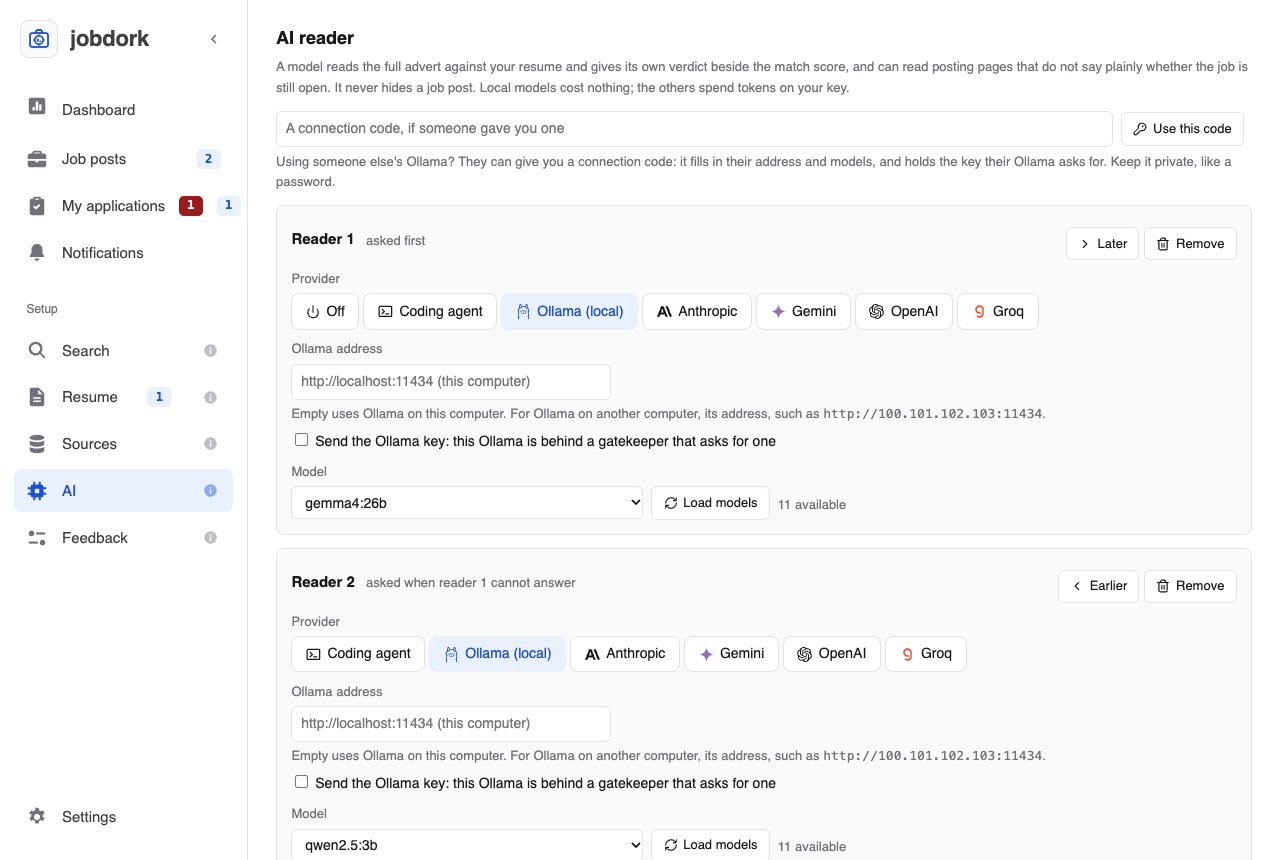
The AI reader page, AI in the menu.
An AI model can read what rules cannot: the whole advert against your whole resume. It gives its own AI score, writes cover letters and tailored resumes, and reviews your resume. It never hides a job post, and jobdork scans without one.
Choosing a model
| Provider | Costs | Your data |
|---|---|---|
| Ollama (local) | Free. Runs on your own computer; needs a recent computer (a Mac with Apple Silicon, or a PC with a graphics card) | Never leaves your computer |
| Anthropic, Gemini, OpenAI, Groq | Paid by use, on your own key from that company (Groq also has a free tier, with low limits) | Sent to that company, with your email, phone number and profile links removed first |
| Coding agent (below) | What your agent costs you already (Claude Code, Codex, Cursor, GitHub Copilot, Claude Desktop); no key in jobdork | Read by your agent, as anything you show it is |
For Ollama: install it from ollama.com, download a
model (ollama pull gemma4:26b), then choose Ollama (local) here and
Load models. For the others: paste your key and Hold in memory.
Which model. Measured on seven resumes in six fields, gemma4:26b made
2.9% unsupported claims; every other local model tried, smaller ones
included, made 10% or more. The numbers, what runs on which computer, and how
to measure a model yourself, hosted ones included:
Choosing an AI model, measured.
Keys are never written to a file, the database or a log. Where they go is your choice (Settings, Your keys):
- Asked each time (the default): held in memory, and forgotten when jobdork stops, when you click Forget, or a minute after the last dashboard tab closes. After jobdork closes or updates, it asks for the key again when it starts.
- Kept in this computer's keychain (macOS Keychain, Windows Credential Manager, or the Secret Service on Linux), encrypted with your login: you enter it once. Forget removes the kept copy too.
Beside each key the line says which: key held until jobdork closes or key kept in this computer's keychain. Remove a line, or switch it to another provider, and Save: a key no line uses any more is forgotten, the keychain's copy too, and a note says so. A key set in your computer's environment, outside jobdork, is not jobdork's to remove and stays.
Coding agent
Already use a coding agent (Claude Code, Codex, Antigravity CLI, Cursor, GitHub Copilot, Claude Desktop)? It can do jobdork's AI work, so you need no API key and no Ollama. Choose Coding agent for a reader, usually Reader 1, and under Which agent the one you use (Claude Code, Codex, Cursor, GitHub Copilot, Claude Desktop, Antigravity CLI), or Any coding agent. One agent is a reader or a checker, never both, since it would then mark its own writing: Claude Code can write while Codex checks, but Claude Code cannot do both. Other readers can still be added after it (below).
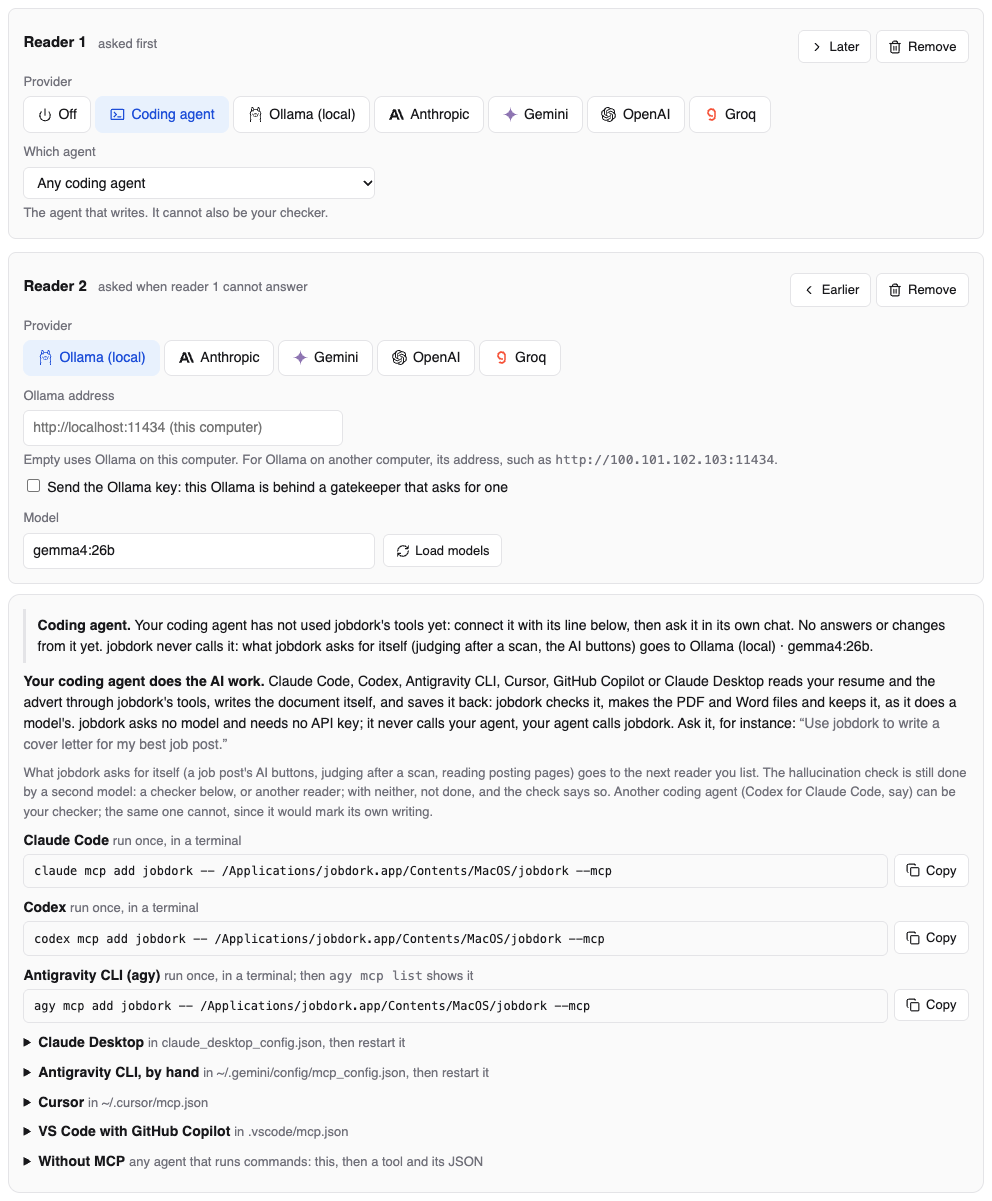
The note at the top of the box says what your agent has done so far: when it last used jobdork's tools (or that it has not yet, so it is not connected), how many answers and changes it has saved, which model answers what jobdork asks for itself instead, and how many checks wait for it. The same note is on the Dashboard, above AI usage.
Your agent calls jobdork, through jobdork's tools; jobdork does not call it by itself. A scan whose judging went to another reader says so once in its log on the Dashboard, so an agent that did nothing is never a mystery. (In the desktop app, the Ask page sends Claude Code a question you type there, and only one about your job search.) Ask it, in its own chat, for instance "Use jobdork to write a cover letter for my best job post". It then:
- Finds the post, and asks jobdork for the brief: exactly what jobdork would have given a model (the instructions, the advert, your resume and record, and the shape of the answer).
- Writes the answer itself, from what the brief contains.
- Saves it. jobdork runs every check a model's answer gets, makes the files (PDF and Word for a resume) and keeps it with the job post, where you see it as you would one a model wrote. What failed goes back to the agent, so it can fix it and save again.
It can write a tailored resume, a cover letter, interview prep, a recruiter message and a resume review; score job posts (their AI score); keep your applications (status, next step, contact, notes); and add projects, education and skills you tell it about to your record.
Connecting it. The page shows the line for each agent, filled in for this computer, each with Copy:
- Claude Code, Codex and Antigravity CLI (
agy, which took over from Gemini CLI): a command to run once in a terminal. Thenagy mcp listshows jobdork. - Claude Desktop, Cursor, VS Code with GitHub Copilot, and Antigravity CLI by hand: a few lines for the file the page names. Restart the app afterwards.
- The Gemini app (gemini.google.com and its desktop app) has no way documented by Google to add a tool like this one, so it is not listed; Antigravity CLI is.
- Without MCP: for an agent that only runs commands, the command that
runs one tool with its arguments (
list_job_posts,get_brief,save_documentand the rest). Running it with no tool lists them.
The connection is an MCP server that jobdork starts on your computer when the agent asks for it: it reads and writes the same data the window shows, and opens no network port.
What jobdork asks for itself goes to the next reader. Your agent answers what you ask it; jobdork never asks it anything on its own. So with the agent as Reader 1, a job post's Write cover letter (AI), Write tailored resume (AI), Interview prep (AI) and the rest show what to ask your agent, with Copy, and, when another reader is listed, a button to have that reader write it instead. Judging after a scan, reading posting pages and the AI tools tab go to the next reader without asking.
With the agent as the only reader, jobdork asks no model at all: the buttons only say what to ask your agent, and scans do not score job posts by AI afterwards (ask your agent to). The AI tools tab's editing help (Tailor my resume, Keyword ideas (AI), Skills to highlight, Recruiter feedback, Revise: 5 versions) says what to ask your agent too, with Copy: it reads the same instructions a model would get, and answers you in its own chat, so nothing is saved under the tab.
The hallucination check is still a second model's. Your agent never checks its own writing. With a checker chosen, it checks everything your agent writes, as it does a reader's; with none chosen, your other readers check instead. With neither, the check is not done, and says so as a check to read: read every claim yourself before you send it.
Guardrails for your agent. jobdork holds it to the same rules as a model, and some more:
- Its own writing is checked by every check a model's gets, and by a second model, never by itself (above).
- What it adds to your record waits for your OK on the Resume page. It cannot take back a skill you confirmed.
- What it changes in an application waits for your OK in My applications: a status, a next step, a contact or a note is made only when you approve it.
- Job adverts are data, not instructions. An advert can hide text meant for an AI. Hidden characters are removed from everything the agent reads from a job board, every answer says that text is from strangers, and the agent is told never to follow it, run a command or open a link because it says so.
- Your contact details stay with you. As for a hosted model, your email, phone number and profile links are removed from your resume and everything else the agent reads; jobdork puts them in the files itself.
- Limits: 30 documents and 60 job post scores an hour, answers up to 64 KB, 25 suggestions waiting at once.
- A record of everything it changes. Each change is a run on the Dashboard, from the coding agent, refused ones too, and its writing is counted with the AI calls. A status or note it set says by Coding agent in the job post's Application tab.
Readers
Reader 1 does the work. Add up to six with Add another reader: when one cannot answer (no key held, not running, rate limited, an error), the next one does, so a second reader keeps things going when the first is down. Earlier and Later move one up or down the order, and Remove takes it out, the first one included once there are two (the next then becomes reader 1). A single reader is turned off with Off. The same provider can be listed twice with different models.
Each reader card has the Provider, the Ollama address (empty uses
Ollama on this computer; for Ollama on another computer, type its address,
such as http://100.101.102.103:11434), the API key (for paid providers) and the Model
(Load models lists what is available; for a model the list does not
have, choose Other: type a model name and type it).
Two big models, one computer short of memory? Run the reader on another computer you own (a PC with a graphics card, say) and the checker on this one: each card takes its own Ollama address. Step by step, with Tailscale so nothing is opened to your network: the AI on two computers.
Using someone else's Ollama? If its owner put it behind a gatekeeper that asks for a key, they can give you a connection code. Paste it in the box above the readers and click Use this code: it fills in their address and models, ticks Send the Ollama key on those lines, and holds the key like any other (in memory, or in this computer's keychain if you chose that). Click Save to keep the lines. Keep the code private, like a password: it carries the key. Without a code, tick Send the Ollama key on the line and paste the key they gave you in its box. The key goes only to the lines with that box ticked, and only once they are saved: click Save, and the line's list of models then loads with the key.
When to use it
- After each scan, judge the top N job posts not yet judged: the AI scores your best new posts by itself after every scan.
- When checking postings, read pages that do not say whether the job is open: helps Check still open with unclear pages.
- Check each verdict and draft for claims your resume and the advert do not support: the hallucination check, below. On by default.
A large local model takes about a minute per job post, and the check adds two more calls to each.
Checkers: a second model to check the first
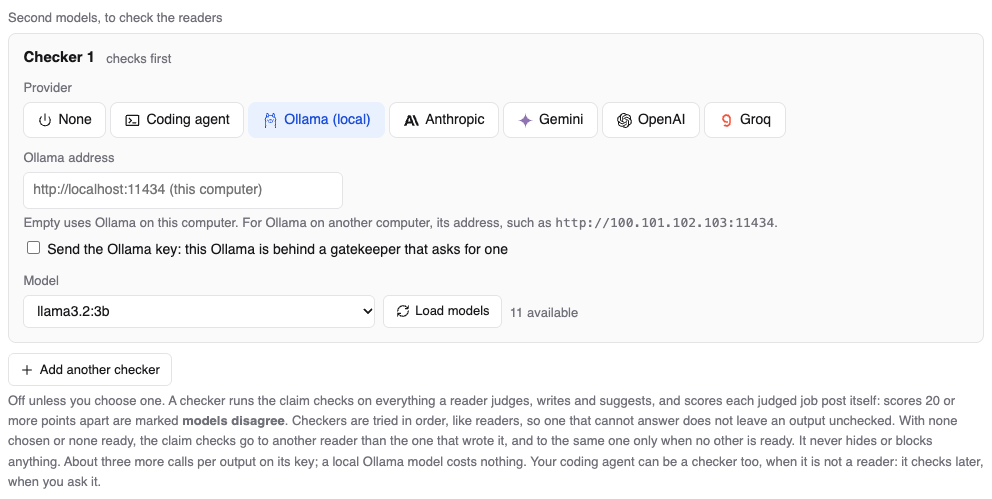
A different model checks the readers' work better than the reader checks itself: one model marking its own work misses what it got wrong the same way twice. Add up to six checkers with Add another checker, tried in order like readers, and moved or removed the same way (a single checker is turned off with None). A checker:
- runs the hallucination check on everything a reader writes, and
- scores each judged job post itself; scores 20 or more points apart are marked models disagree.
With no checker chosen (or none ready), the check goes to another of your readers than the one that wrote it, and to the same one only when no other is ready. A checker costs about three more calls per output on its key; a local Ollama model costs nothing.
Your coding agent as a checker
Choose Coding agent for a checker, and under Which agent the one that checks: it runs the hallucination check on what your readers write, judge and suggest. The same agent cannot be a reader too, either way round: with Claude Code as a reader, the checker can be Codex, Cursor or another agent, never Claude Code, and the page offers only those. A reader line set to Any coding agent leaves no agent to check, and the other way round. An agent never checks its own writing: what Claude Code wrote, Claude Code is refused when it tries to check it, and an agent named as the checker is refused when it tries to write in a reader's place.
jobdork never calls your agent, so the check waits until you ask it, in its own chat, for instance "Check jobdork's AI writing". Until then the check says waiting for your coding agent, and a document's checks list it as one to read: read those claims yourself before you send anything. Your agent then, for each output waiting:
- Splits the text into claims, as a checker model would.
- Says for each claim whether your resume or the advert supports it, with the exact words that do.
- Saves the check. jobdork holds every quote to its source, as it does a model's: a claim whose quote is not there counts as not supported. The check then shows like any other, checked by Coding agent.
A checker listed above your agent checks first; your agent checks only what that one could not. Your agent checks claims only: it does not give each judged job post a second score (models disagree), which needs a model.
Which local model checks best. Measured in October 2026 on 30 AI
verdicts (574 facts, the true answer for each decided by hand), checking
gemma4:26b's work: qwen3.8:27b was right about 99% of the time and
caught the most real mistakes; mistral-small3.2:24b came second; gemma4
checking itself raised five false alarms for every real one. Small models
cannot do it: llama3.2:3b and phi4:14b (its context is too short)
flagged nearly everything. A checker needs about as much memory as the
reader, so with both local, 48 GB is comfortable. Download it with
ollama pull qwen3.8:27b. One resume and one person's answers: a direction,
not a benchmark.
The hallucination check
AI models sometimes state things that are not true: hallucinations. For a job application that matters: a cover letter claiming a certification you do not have can cost you the job.
So every verdict, letter, review and tailored resume is checked:
- The text is split into single facts ("Has seven years of telemetry nursing").
- Each fact is looked up in your resume and the advert. A fact only counts as supported if its exact words are found there, by a script, not just because a model says so.
- A gap ("the resume does not mention Django") is checked the other way round: a script makes sure the missing thing really is nowhere in your resume. If it is there after all, the gap is flagged as wrong.
- Facts found in neither are flagged: struck out in an AI verdict, listed on a letter, marked Read this on a document.
- A verdict with flagged facts is put right once: the reasons and concerns they came from are taken out, and when one came from the summary the AI writes that sentence again without it. The result is checked the same way, and the one with fewer flagged facts is kept and shown (When the check flags a verdict's claims… on this page turns it off; it costs a check, and a call when the summary is rewritten).
An overall opinion ("meets the seniority requirements", "overqualified") is not counted as a fact either: it is the score in words.
Your years of experience are counted by jobdork from the dates in your resume (roles that overlap counted once, study left out). The AI is given that figure for verdicts, letters and tailored resumes rather than adding up dates itself, and the check accepts it.
The more true facts the AI has, the fewer of its claims are unsupported: upload your master resume if you keep one.
What a text says about itself, such as a letter's "I am applying for…" or a resume summary's "seeking a Software Engineer role", is not counted as a fact: no source could support it.
The Dashboard shows the share of unsupported facts over time (the hallucination rate) in what you were shown, by kind of writing, by model and by checker, so you can see which model to trust; the Hallucination tile also says how many verdicts were rewritten. It is coloured against jobdork's target of 2 to 5%: green at 5% or under (within target), amber above 5% up to 10% (watch it), red above 10% (too high; try a bigger model, or add a checker). The method follows HalluLens, a published way of measuring hallucination.
Free Gemini and Groq keys
A free key allows so many requests a minute and a day, set per model by the provider; once a day's are spent, the key answers nothing until the next day. jobdork keeps under the limits, so a free key lasts:
- It spaces its requests to stay under the per-minute limit, and waits when the provider says to.
- A scan's AI reading stops 5 requests short of the day's limit, keeping those for what you ask yourself (a letter, a review, Save and test). The next reader in your list answers instead: put Ollama after a free key, and nothing stops.
- When a model is stopped, the AI page says why and when it is asked again.
Free Gemini and Groq keys: today's allowance on the AI page shows each model's requests used and left today. Groq sends its numbers with every answer. Gemini says its limits only when it refuses, so jobdork learns them then; to stop sooner, type the daily limit Google AI Studio shows you in Gemini, requests a day. Gemini's day starts at midnight Pacific time (2 am in Chicago; 3 pm in Manila, or 4 pm in the US winter).
Save and test
Save keeps your choices. Save and test also asks every reader and checker to answer, and says how long each took or why it could not. While it asks, the button shows Testing… with a spinning circle: a hosted model answers in seconds, a local one can take a minute.