The job post window
Click a job title, or Open, to see one post in full. Opening a new post marks it viewed. On a wide window it opens beside the list on Job posts, with the list still there to choose the next; on a narrower one, and from other pages (the Resume page's Job post), in a window over the page. Both hold the same things.
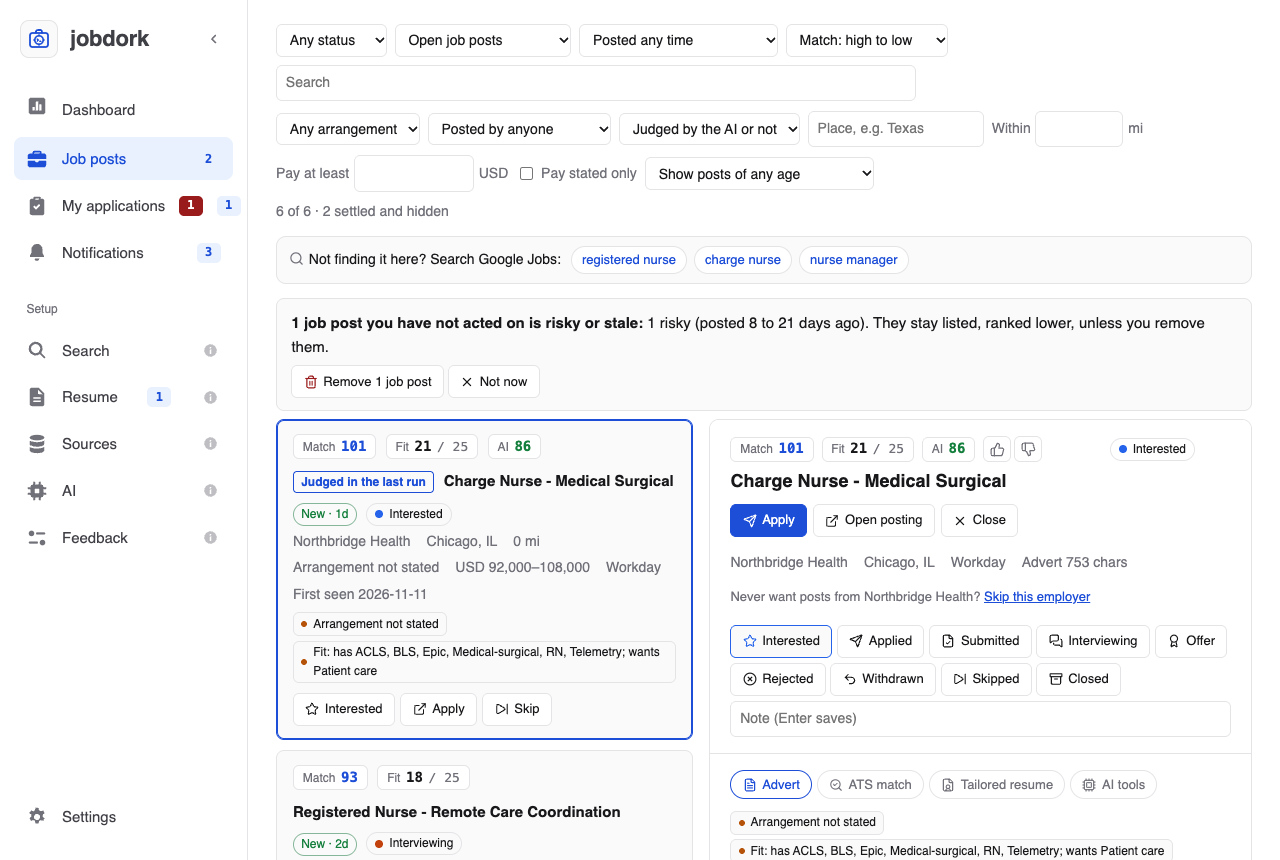
The top
- Match, Fit and AI scores (explained), and the status.
- Thumbs up and down beside the AI score: was the AI verdict useful? Your answers are counted on the Dashboard; they are how you can tell whether a model is worth keeping.
- Apply opens the employer's page in your browser and marks the post applied, as the card's Apply does. Open posting only opens it. Close closes the window, or empties the space beside the list.
- The employer, place, arrangement, source, and how long the stored advert is. Also posted at lists the other places the same job was found, and whether each is still up. Skip this employer adds the employer to Search's Employers to skip: its posts are dropped, this one with them, and the window closes.
- The status buttons (what each means). The current status is outlined in its colour. Under them, your Note on the post (Enter saves), the same one the card has.
Advert
The whole job advert, with:
- Tags to know: what to know before you apply (tags).
- On the employer's own board? For a post from Adzuna, Himalayas, Arbeitnow or Kalibrr: what the last scan found on the employer's own board (on it, not on it, read only partly, or not read). Check the employer's own board asks that board now, for this job's title, and says whether it is there, with a link if it is. Useful when the scan could not tell, or before you apply.
- Certifications and licenses this post asks for: each line of the advert that asks for one, marked required or preferred, and a tick for the ones you have (from your resume, or your list on Search).
- Paste the full advert (or Replace the advert): some sources send only a summary. Open the posting, copy the whole description, paste it and Save and re-screen: the rules and scores read it at once.
- Check if still open: asks the posting now (listing tags).
AI tools
Everything the AI does for one post is on the AI tools tab. Buttons with an amber icon use the AI model from the AI page: free with a local model, paid by the word with Anthropic, Gemini, OpenAI or Groq.
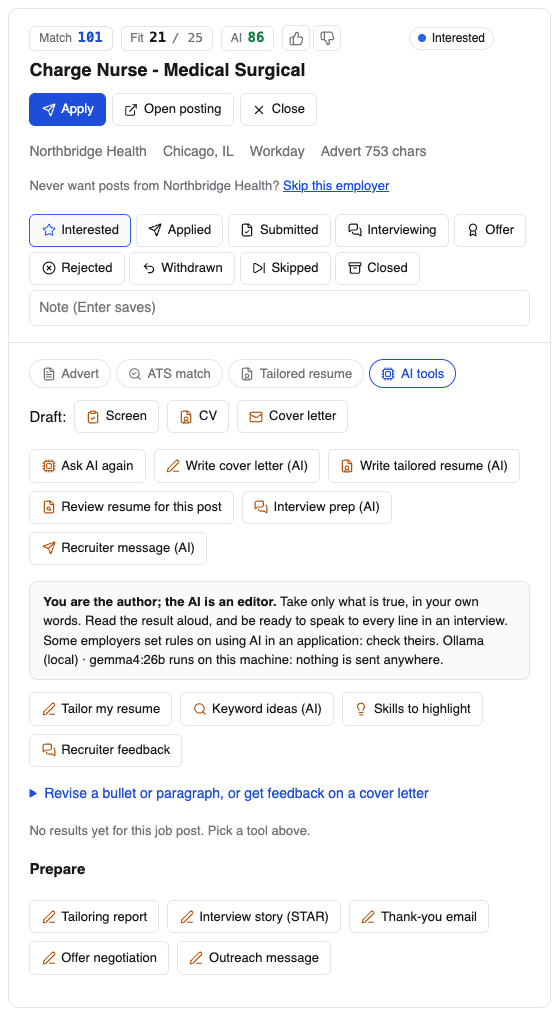
You are the author; the AI is an editor
Take only what is true, in your own words. Read the result aloud, and be ready to speak to every line in an interview. Some employers set rules on using AI in an application: check theirs. With a hosted model, your email, phone number and profile links are removed before anything is sent.
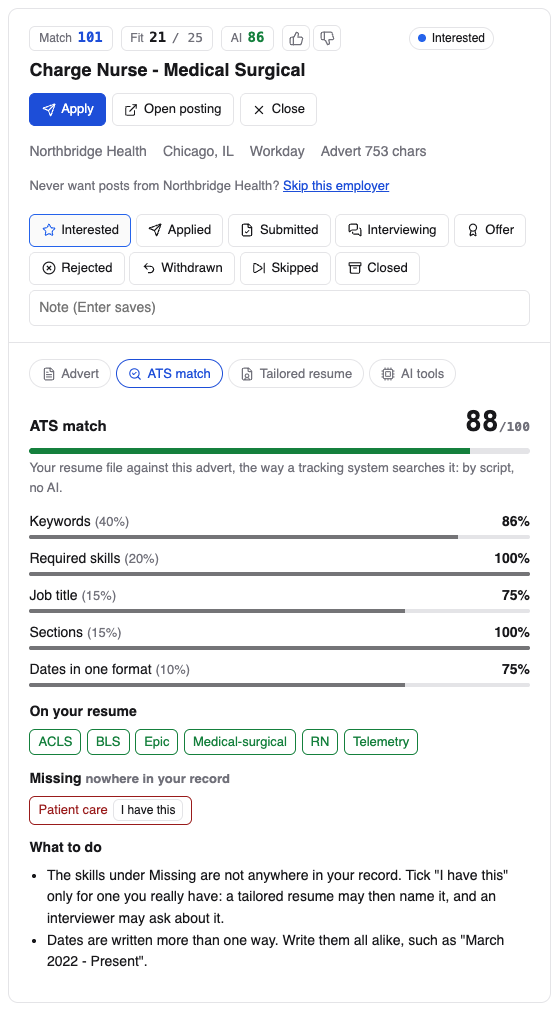
ATS match
The ATS match tab scores your resume file against this advert the way an applicant tracking system searches it, out of 100, by script and with no AI (the parts and weights follow Resume Matcher's):
| Part | Weight | What it measures |
|---|---|---|
| Keywords | 40% | The advert's skills your resume names |
| Required skills | 20% | The same, of the skills under the advert's Requirements or Qualifications (the whole advert when it has no such part) |
| Job title | 15% | The post's title at the top of your resume (100), in its summary (75), or some of its words at the top (up to 50) |
| Sections | 15% | An email or phone, and the summary, experience, education and skills headings |
| Dates in one format | 10% | How many of your dates are written the same way |
A part that cannot be judged is left out and the rest weighed to 100. The skills come from the same list as Fit, and only those in your field count.
Below the score, the advert's skills in three groups:
- On your resume.
- Safe to add: in your projects, education or confirmed skills on the Resume page, but not in your resume file. A tailored resume for this post can name them.
- Missing: nowhere in your record. I have this adds one to your confirmed skills: from then on it counts as part of your record, so Fit scores count it (job posts are re-scored) and a tailored resume may name it. Tick it only for a skill you really have; an interviewer may ask. take back removes one.
What to do lists the changes that would raise the score.
The main buttons
| Button | What you get |
|---|---|
| Ask AI / Ask AI again | The AI's verdict on this post: a score, a summary, and the reasons for and against |
| Write cover letter (AI) | A cover letter from your resume and this advert, in four short paragraphs and 250 to 300 words: an opening on something specific in the advert, one achievement of yours that answers its first requirement, why this job, and a line asking for a conversation. It never mentions a requirement you lack. The checks say Read this for a letter outside its length or with a stock phrase ("passionate", "team player"). It opens in a new Cover letter tab, and is listed on the Resume page |
| Write tailored resume (AI) | Your resume rewritten for this advert, as a PDF and a Word file named FirstName_LastName_JobTitle_Resume, in a plain layout that applicant tracking systems read well (the layout). It opens in a Tailored resume tab. Your contact line is copied from your resume, never written by the AI, and any employer, school, skill, certification or award your resume does not name is left out and listed |
| Interview prep (AI) | Ready for the interview: what it gives. Opens in an Interview prep tab |
| Recruiter message (AI) | A short message to a recruiter or hiring manager: how it is written. Opens in a Recruiter message tab |
| Review resume for this post | What to change in your resume for this post, each point quoting the line it is about, and what the advert asks for that your resume does not show. Opens in a Resume review tab |
Interview prep
From your resume, your Resume page entries and this advert:
- Why you fit: three to five points where your resume meets what the advert asks for.
- Fifteen likely questions, as interviews are run today, in three groups: Behavioral: about your past, About the work itself and What would you do, five each. Each says what it really finds out and gives answer points from your resume; the ones nearly every interview for this kind of job asks are marked high priority. At least two ask about a failure or a weakness: the a failure or weakness check says Read this when fewer do, so you prepare one of your own.
- Follow-ups on your work: three to six deeper ones about a job or project you list (what was hard, what you would change, how a result was measured).
- Gaps to prepare: three to five things the advert wants that your resume does not show, why they may come up, and how to answer honestly. A gap is never written as something you have: the gaps not claimed check says Read this if one reads that way.
- Talking points: five to eight lines to work into your answers.
- Answers to build (STAR): for the three hardest behavioral questions, an outline from what your resume shows: situation, task, action (what you did) and result, with a number only if your resume has one. For a story of your own, use Interview story (STAR) under Prepare.
What it says about you (the fit, the answer points, the talking points) gets
the hallucination check and the figures check, as a letter does. Saved as
interview-prep-ai.md in the job's folder.
Recruiter message
A message of 70 to 100 words for LinkedIn or an email: its first sentence
names something from the advert (never "I'm reaching out"), one sentence on
your strongest match with a figure only if your resume has one, and a small
ask ("Worth a quick chat?"). No "excited" or "passionate", no greeting, no
placeholders. It gets the same checks as a letter, and a word count
check. Copy message copies it: jobdork never sends anything; paste it
yourself. Saved as recruiter-message-ai.md.
Both follow Resume Matcher's (srbhr/resume-matcher) interview prep and outreach message, rewritten with jobdork's rules.
Editing help
| Button | What you get |
|---|---|
| Tailor my resume | Suggested edits, not a new resume: rewordings of your lines (tick the ones you want), which lines to move up, and a skills line from skills you have that the advert asks for. An edit that adds a number you never wrote is left unticked, in red. Download tailored resume gives your resume with the ticked edits |
| Keyword ideas (AI) | The ten words the AI expects an applicant tracking system to look for in this advert, each marked found or missing in your resume. The ATS match tab scores the same advert by script, for free; the AI can name terms beyond the skills list it uses. (Called ATS keywords before 0.16.1) |
| Skills to highlight | The advert's three most important skills, the three things you did that best show them, and strong verbs for the role |
| Recruiter feedback | The AI reads your resume as this post's recruiter would: strengths and gaps |
Under Revise a bullet or paragraph, or get feedback on a cover letter, paste text of your own:
- Revise: 5 versions: five rewordings of one bullet or paragraph, fitted to this post, with no new facts.
- Recruiter feedback on this letter: a recruiter's view of a whole cover letter.
Results stay under the tab, each with the model that wrote it and when; a revision has Copy beside each version.
With a coding agent as your only reader, each button says what to ask your agent instead, with Copy (with your pasted text for a revision or a letter). Your agent answers in its own chat, from the same instructions a model gets; nothing is saved under the tab.
Prepare
Under Prepare, at the foot of the tab, the AI helps with the rest of an application. Each button opens a short form (what it needs from you); Write it starts it, and the answer appears under the buttons when it is done, with Copy for the parts you would paste somewhere.
| Button | What you get | What it asks |
|---|---|---|
| Tailoring report | What the advert stresses most; each requirement, ✓ with the line of your resume that shows it or ✗; how to handle one you lack (a related skill, being willing to learn, or saying it is a gap); what a recruiter may question and how to prepare; what a summary should lead with | Nothing |
| Interview story (STAR) | Your story as situation, task, action, result, and the same said aloud in 60 to 90 seconds, with three likely follow-up questions and anything in it that could sound like blame | The question, and what happened, in your words |
| Thank-you email | A subject and a 150 to 200 word email for the day after the interview, about what you actually talked about, answering a concern if they raised one | Who interviewed you, what you talked about; optionally what you wish you had said better and a concern they raised |
| Offer negotiation | The words to counter with, three or four reasons tied to what you gave, replies to the usual pushbacks, what to ask for when the salary cannot move, and how to settle your minimum. Never an ultimatum | What they offered and what you want; optionally the market figure and where you read it, your strongest points and what else you would take |
| Outreach message | A LinkedIn connection request (under 300 characters) and InMail (under 500) to someone at the employer, with one small ask and an easy way to say no, a follow-up for a week later, and what to be ready to talk about | Their role, the one thing you want to learn; optionally how you found them and something you share |
Every answer is held to the rules of this tab: what it says about you comes from your resume or what you typed into its form, and it is checked as every result is (below). A script also checks what it can and lists it as Read this: a requirement marked as yours with no line of your resume behind it is turned to ✗; a story whose action says "we", or that is too long to say in 90 seconds; an email outside its length; a message over LinkedIn's limit or that mentions a job in a first message; a stock phrase a reader sees through ("passionate", "team player", "pick your brain"). The answers are kept in the post's folder.
Drafts through Claude Code
Draft: Screen, CV, Cover letter use the claude command-line tool, a
separate program from the AI page (installed with
Claude Code). Without it these buttons are
greyed out and the rest still works.
- Screen: is this worth applying to? A short, cheap read of the advert that flags travel, title mismatches and pay problems before you spend time on a CV.
- CV and Cover letter: drafts saved in your documents folder.
Every result is checked
Before you see anything the AI wrote, jobdork checks it:
- The hallucination check: the text is split into single facts and each is looked up in your resume and the advert. A fact found in neither is flagged: struck out in a verdict, listed with a letter. "Ten years of Java" where your resume says ten years in total does not reach an employer unread. More
- Signs of AI writing: stock phrases ("spearheaded", "leveraged"), long dashes, "not X but Y". Each one left is named so you can fix it.
- Figures: any number or "large team" in a draft that is not in your resume.
In a document's tab, each check shows Passed, with a green dot, or
Read this, with an amber one: look at it before you send anything. The thumbs on a document say whether it helped.
Open PDF and Download PDF are on resumes and CVs, and Download
Word gives the same resume as a .docx to edit in Word, Pages or Google
Docs before you send it.
The tailored resume
From a master resume it chooses what this job post needs, from anywhere in it, and leaves the rest out; from the resume you send, it rewrites that one. Laid out like Indeed's free resume template, one column:
- your name, then Phone | Email | City, State, then your website or LinkedIn, centred;
- Professional summary, Experience, Skills, Education, Certifications, then Awards & volunteer work, each left out when your resume has nothing for it. A student's Education comes right after the summary, and projects go where your career stage puts them;
- each job as its title with the dates at the right margin, then
Company, City, then its bullets; skills separated by
|.
Its length follows Indeed's advice: one page for up to ten years of experience, two after that, and three only past 25 years or for academic and medical jobs. Jobs that ended more than 15 years ago are left out (unless it is the only one), the newest job keeps up to seven bullets and older ones fewer, and when it still runs over, an older job's last bullets go first. The page count check says how many pages it fills and lists everything left out to fit, so you can put back what matters by hand in the Word file. Arial at 11 points, 0.7 inch margins, US Letter.